A finding is a problem one of our checks has detected on your domains, websites or network. Each one comes with what you need to fix it and a way to prove it's fixed.
To pick one, select Fix top finding on your dashboard, choose one from Today's focus, or open Findings in the sidebar.
Work through the four steps
Every finding page is laid out in the same four steps.
1. Why this matters
What the problem is and what it could lead to, and how fixing it helps your posture score.
2. How to fix it
Step-by-step instructions. Switch between Simplified, Standard and Technical to get the level of detail that suits you. Open Test plan & rollback to see how to test the change and how to undo it if something goes wrong.
3. Where it applies
The assets affected and the exact evidence we found on each, so you can see what to change and where.
4. Prove it is fixed
Once you've made the change, select Verify Fix. We run the check again on that asset:
- Some DNS and web header checks give an answer straight away.
- Others start a fresh scan and update when it finishes.
If the check passes, the finding is marked Fixed and it stops counting against your posture score. If it still fails, the finding stays open and the evidence shows what we still see.
You don't have to verify. Our scheduled scans also check again, and a finding that's no longer detected is marked Fixed automatically.
DNS changes can take time to reach everyone. If you've just changed a record and the check still fails, wait a while and try again. Manual checks have a daily limit, which resets each day.
Finding statuses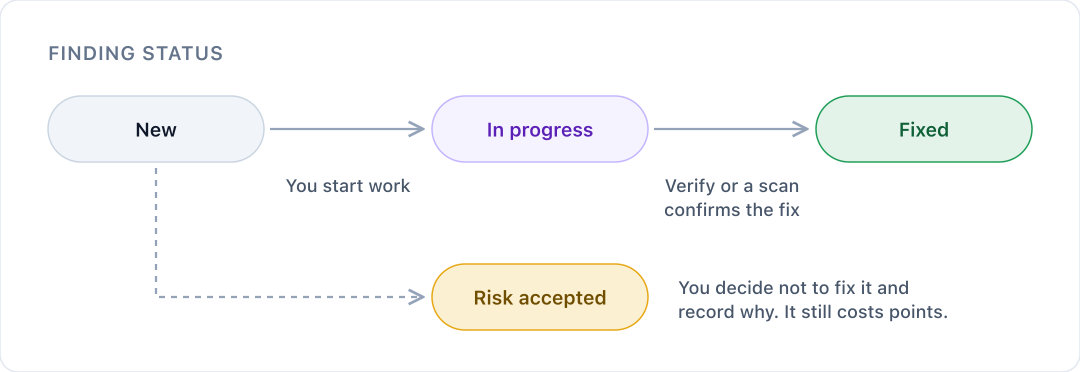
| Status | What it means |
|---|---|
| New | We've found it and nobody has started on it yet. |
| In progress | Someone is working on the fix. |
| Fixed | A check has confirmed the problem is gone. |
| Risk accepted | You've decided not to fix it, and recorded why. |
| Not applicable | Set by us when a check no longer applies to an asset. |
Accepting a risk
Sometimes the right call is not to fix something, for example when another control already covers it. Select Accept risk on the finding and give your reason. The finding stays on record with your reason, so anyone reviewing it later can see the decision.
Accepting a risk doesn't make the finding go away: it still counts against your posture score until it's fixed, although it no longer holds your posture score down on its own. It's worth reviewing accepted risks from time to time, in case things have changed.
Work through many findings at once
- Bulk actions: select several findings to change their status, assign them to someone, or snooze them for 1, 7 or 30 days. Accepting risks in bulk still asks for a reason.
- Remediation board: see findings in columns for New, In progress and Risk accepted, and drag a card to Fixed when you're done. Use My work to see only findings assigned to you.
Every change, single or bulk, is recorded in your audit trail.
Who can fix findings
Owners, Managers and Analysts can change statuses, assign findings and verify fixes. Members and Viewers can see findings but not change them.
Was this article helpful?
That’s Great!
Thank you for your feedback
Sorry! We couldn't be helpful
Thank you for your feedback
Feedback sent
We appreciate your effort and will try to fix the article