Your posture score is a single letter, from A to F, that shows how well your internet-facing assets stand up to the checks we run from the outside. Every letter comes from your own findings and scans.
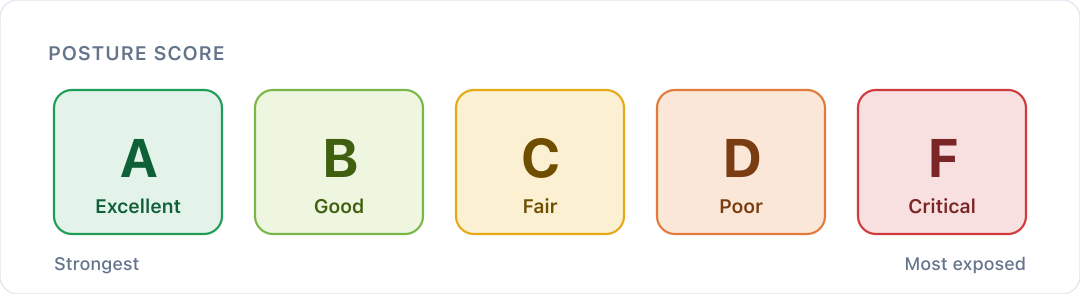
| Posture score | What it means |
|---|---|
| A Excellent | Your external posture is strong. |
| B Good | Solid, with some gaps to close. |
| C Fair | Several gaps worth planning in. |
| D Poor | Serious gaps that need attention soon. |
| F Critical | Critical gaps that need fixing now. |
Three things set your letter, and the lowest of the three wins.
1. Your checks
Every check we run on every asset either passes or leaves an open finding. Each check carries risk points based on its severity:
| Severity | Risk points | What it means |
|---|---|---|
| Critical | 50 | Fix now |
| High | 20 | Fix this month |
| Medium | 10 | Plan it in |
| Low | 5 | Defence in depth |
| Info | 0 | Never moves your posture score |
The share of risk points you pass sets your starting letter:
| Risk points passed | Starting letter |
|---|---|
| 90% or more | A |
| 75% to 89% | B |
| 60% to 74% | C |
| 40% to 59% | D |
| Under 40% | F |
Checks that haven't run on an asset don't count either way, so a new asset doesn't pull your posture score down before we've looked at it.
For example: say your passing checks are worth 440 risk points and your open findings 160, out of 600. You pass about 73%, which starts you at C. Fix one critical finding and its 50 points move across: 490 of 600 is about 82%, which starts you at B.
2. Your weakest security domain
Your posture score can be at most one letter above your weakest security domain. If email authentication sits at D, your posture score can't go above C. A domain we haven't assessed yet doesn't count: an unknown isn't a failure.
3. Your worst open finding
An open critical finding holds your posture score at D or below, an open high at C, and an open medium at B. Low and info findings don't hold it down.
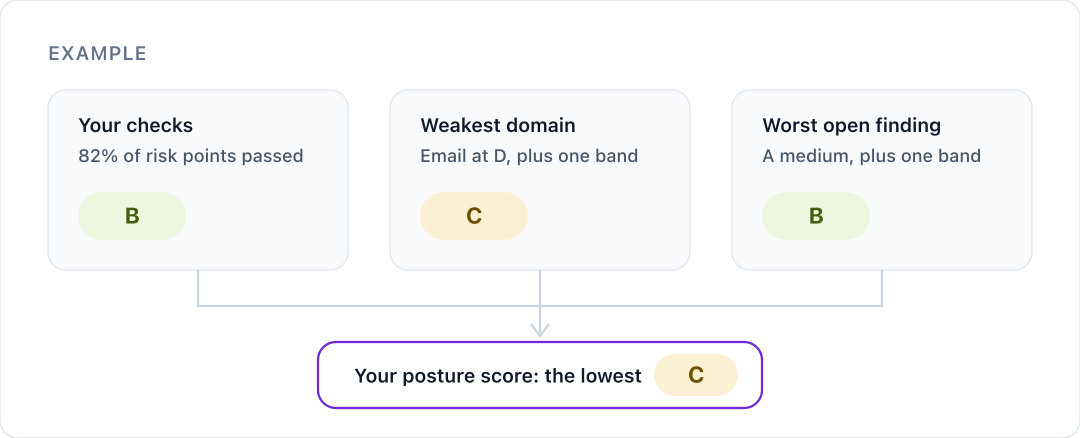
When your posture score is held down by your weakest domain or a finding, the verdict under it on your dashboard names what's responsible, so you know what to fix first.
Your six security domains
Your dashboard also gives each of the six areas we check its own letter:
- Brand protection
- Cloud exposure
- DNS security
- Email authentication
- Network exposure
- Website security
An open high or critical finding holds that domain at C until it's fixed. A domain with nothing to assess shows Not scored. For the weakest-domain check, website security is split into three parts: HTTP security headers, SSL/TLS certificates, and exposed files and software.
What moves your posture score
- Fixing a finding counts its risk points as passed once a scan confirms the fix. Use Verify Fix on the finding to check straight away, or wait for the next scheduled scan.
- Accepting a risk records your decision but doesn't win back the points. A risk-accepted finding still counts against you, although it no longer holds your posture score down on its own.
- Info findings never move your posture score.
- New assets and new findings can move it either way as we scan them.
See the detail
For the risk points behind your letter, open Scoring methodology in the sidebar. It shows your own findings and scans, and which fixes would lift your posture score the most.
Was this article helpful?
That’s Great!
Thank you for your feedback
Sorry! We couldn't be helpful
Thank you for your feedback
Feedback sent
We appreciate your effort and will try to fix the article