SPF (Sender Policy Framework) is a DNS record that lists the mail servers allowed to send email for your domain. Receiving mail servers check it to decide whether a message came from somewhere you've authorised.
SPF is defined in RFC 7208.
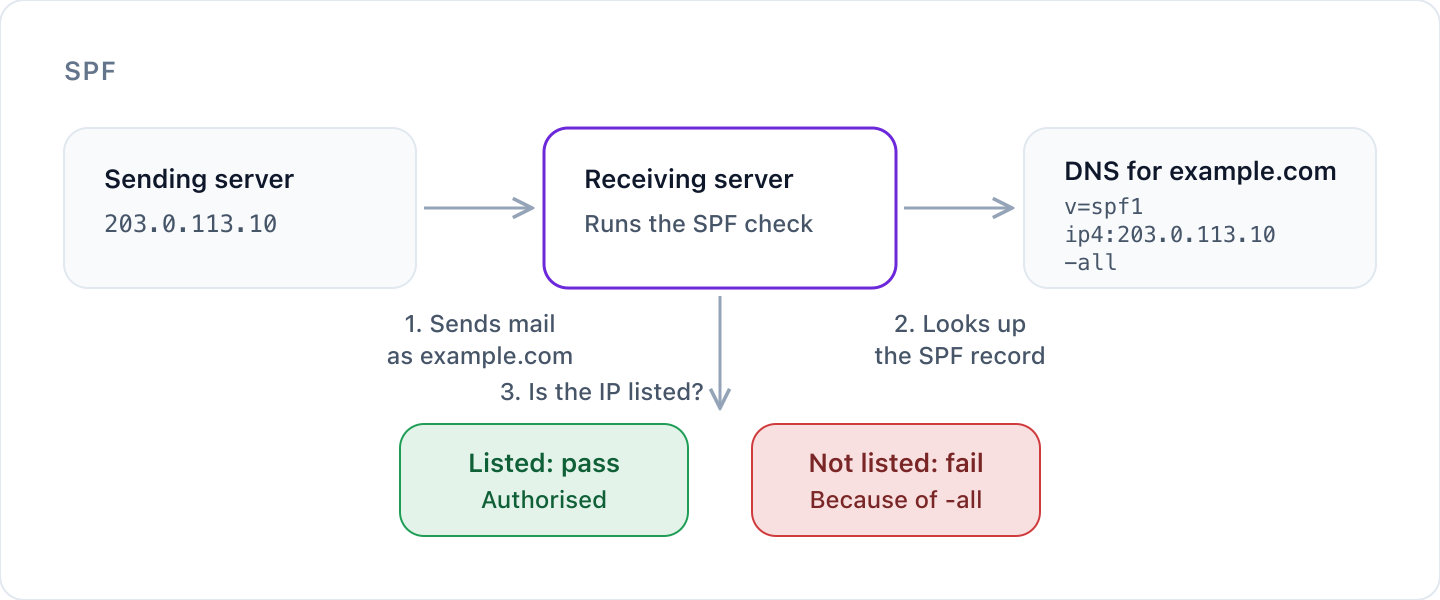
How SPF works
- You publish a TXT record on your domain that starts with
v=spf1and lists your approved senders. - A server sends a message using your domain in the envelope sender, also called the MAIL FROM or return path. This is the address bounces go back to, not necessarily the From address people see.
- The receiving server looks up the SPF record for that domain and checks whether the IP address that's connecting is on the list.
- It gets a result, such as pass or fail, and uses it to help decide what to do with the message.
What an SPF record looks like
v=spf1 include:_spf.google.com ip4:203.0.113.10 -all
| Part | What it does |
|---|---|
v=spf1 | Marks the record as SPF. It must come first, exactly as written. |
include: | Authorises everything in another domain's SPF record. Email providers give you one of these, like include:_spf.google.com for Google Workspace. |
ip4: and ip6: | Authorise a specific IP address or range. |
a and mx | Authorise the servers your domain's A or MX records point to. |
-all | Says what to do with everything not listed. It always goes last. |
Ending your record: the all qualifier
| Ending | Result for unlisted senders | When to use it |
|---|---|---|
-all | Fail: not authorised | Once your list of senders is complete. This is the goal. |
~all | Softfail: probably not authorised | While you're still finding all your senders. |
?all | Neutral: no statement either way | Rarely useful. It gives receivers nothing to act on. |
+all | Pass: anyone may send as you | Never. It authorises every server on the internet. |
What the results mean
RFC 7208 section 2.6 defines seven results:
| Result | Meaning |
|---|---|
| Pass | The sending server is authorised. |
| Fail | The sending server is explicitly not authorised. |
| Softfail | The sending server is probably not authorised. |
| Neutral | The domain makes no statement about this server. |
| None | The domain has no SPF record. |
| Temperror | A temporary problem, usually DNS. A later retry may work. |
| Permerror | The record is broken and needs fixing before it can be used. |
Limits and common mistakes
Only one SPF record per domain
If a domain has more than one record starting with v=spf1, the result is permerror (RFC 7208 section 4.5). Merge them into a single record.
No more than 10 DNS lookups
The include, a, mx, ptr and exists mechanisms and the redirect modifier each cost a lookup, including any inside the records you include. ip4, ip6 and all don't count.
Go over 10 and SPF stops working for all your mail. The result is permerror (RFC 7208 section 4.6.4), which receivers treat as a broken record.
Watch for lookups that return nothing
Receivers should allow no more than two lookups that return no answer (section 4.6.4). An include for a service you've stopped using is a common cause.
Don't use ptr
RFC 7208 section 5.5 says ptr should not be published: it's slow and unreliable.
Keep the record short
Section 3.4 recommends keeping SPF answers under 450 octets so they fit in a single DNS response.
Lock down domains that don't send email
Publish v=spf1 -all so nobody can send as them.
What SPF doesn't do
SPF checks the envelope sender, not the From address people see in their inbox. A spoofer can pass SPF with their own domain in the envelope and still put yours in the From line.
SPF also tends to fail when mail is forwarded, because the forwarding server isn't on your list.
That's why SPF works best alongside DKIM and DMARC. DMARC ties the result back to the From address people actually see.
Check your SPF record
Use our free SPF checker to see your record, count its lookups and spot problems.
Cyber Perimeter checks SPF on your domains every day. It tells you when a record is missing, duplicated, broken, over the lookup limit, too permissive, or includes services you no longer use, with the steps to fix each one.
Was this article helpful?
That’s Great!
Thank you for your feedback
Sorry! We couldn't be helpful
Thank you for your feedback
Feedback sent
We appreciate your effort and will try to fix the article