DMARC (Domain-based Message Authentication, Reporting and Conformance) protects the From address people see in their inbox. It tells receiving servers what to do with email that claims to be from your domain but fails authentication, and asks them to send you reports on who's sending as you.
DMARC is defined in RFC 7489.
Why DMARC matters
SPF and DKIM each check a domain, but neither has to be the domain in the From address. Without DMARC, a scammer can send mail that passes SPF or DKIM for their own domain while showing yours in the From line.
DMARC closes that gap by checking that the authenticated domain matches the one people see.
How DMARC works
A message passes DMARC if at least one of these is true (RFC 7489 section 4.2):
- it passes SPF, and the envelope sender domain aligns with the From domain
- it passes DKIM, and the signing domain (
d=) aligns with the From domain
If neither is true, the receiver applies your DMARC policy.
Alignment
Alignment means the domains match (RFC 7489 section 3.1). There are two modes:
- Relaxed (the default): the domains share the same organisational domain.
mail.example.comaligns withexample.com. - Strict: the domains must be exactly the same.
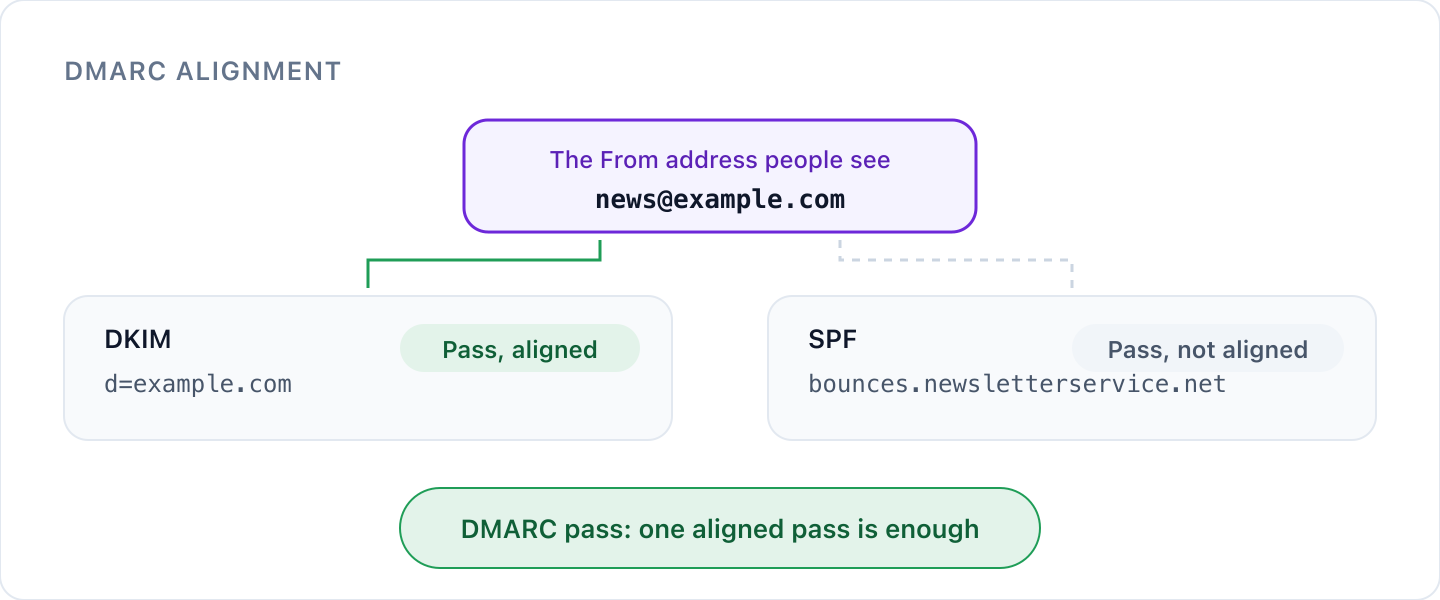
For example, a newsletter sent with From: news@example.com:
| Check | Domain | Aligned (relaxed)? |
|---|---|---|
| DKIM signature | d=example.com | Yes |
| SPF envelope sender | bounces.newsletterservice.net | No |
This message passes DMARC through DKIM, even though SPF isn't aligned. That's common with third-party senders, and why signing with DKIM on your own domain matters so much.
What a DMARC record looks like
DMARC is a TXT record at _dmarc on your domain:
_dmarc.example.com TXT "v=DMARC1; p=reject; rua=mailto:dmarc@example.com"
| Tag | What it does |
|---|---|
v=DMARC1 | Marks the record as DMARC. It must come first. |
p= | Your policy: none, quarantine or reject. Required. |
rua= | Where to send aggregate reports. Without it, receivers send you no reports. |
sp= | A separate policy for subdomains. If it's missing, subdomains follow p=. |
pct= | The percentage of failing mail the policy applies to. Defaults to 100. |
adkim= and aspf= | Alignment mode for DKIM and SPF: r for relaxed (default) or s for strict. |
ruf= | Where to send failure reports about individual messages. Few receivers send these. |
The three policies
| Policy | What receivers do with failing mail |
|---|---|
p=none | Nothing different. You only get reports. Use this to start. |
p=quarantine | Treat it as suspicious, usually by sending it to spam. |
p=reject | Refuse it. This is the goal: spoofed mail never reaches the inbox. |
Rolling out DMARC safely
- Start with
p=noneand aruaaddress. Nothing changes for your mail, but reports start arriving, usually daily. - Read the reports. They show every service sending as your domain and whether it passes. Fix SPF and DKIM for each legitimate sender until they pass and align.
- Move to
p=quarantine. If you want to go gradually, usepct=to apply it to part of your failing mail first, then raise it to 100. - Move to
p=reject. Keep reading reports afterwards, so a new service you start using doesn't get blocked.
Don't stop at p=none. It gives you visibility but no protection: spoofed mail still gets delivered.
Subdomains and domains that don't send email
If a subdomain has no DMARC record of its own, receivers use the record on your organisational domain (RFC 7489 section 6.6.3), with sp= if you set it. Attackers like unused subdomains, so make sure your policy covers them.
For domains that never send email, publish v=DMARC1; p=reject along with v=spf1 -all.
DMARC reports
Aggregate reports are XML files that list, for each sending source, how much mail it sent and whether it passed SPF, DKIM and DMARC. They're very useful and hard to read by hand.
Cyber Perimeter can receive your DMARC reports and turn them into a clear view of who's sending as you, what's failing and when you're ready to move to a stronger policy.
Check your DMARC record
Use our free DMARC checker to see your current record, or the DMARC record generator to build one.
Was this article helpful?
That’s Great!
Thank you for your feedback
Sorry! We couldn't be helpful
Thank you for your feedback
Feedback sent
We appreciate your effort and will try to fix the article