DKIM (DomainKeys Identified Mail) adds a digital signature to every email you send. Receiving servers use it to confirm two things: the message was signed by your domain, and it hasn't been changed since.
DKIM is defined in RFC 6376.
How DKIM works
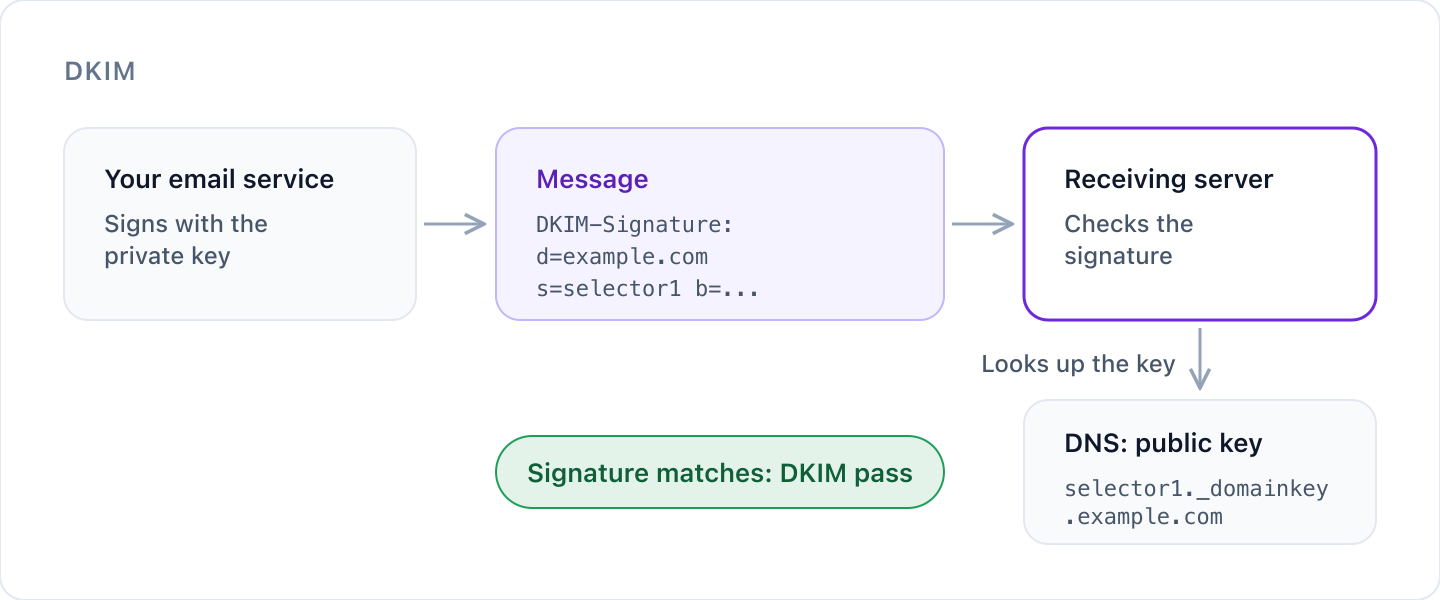
- Your email service holds a private key and signs each outgoing message with it. The signature covers the body and a chosen set of headers, and is added as a
DKIM-Signatureheader. - You publish the matching public key in DNS.
- The receiving server reads the signature, looks up your public key and checks the signature against the message.
- If it matches, the message passes DKIM: it came from a server holding your key, and nothing covered by the signature changed on the way.
The signature header
Every signed message carries a header like this (shortened):
DKIM-Signature: v=1; a=rsa-sha256; d=example.com; s=selector1;
 h=from:to:subject:date; bh=...; b=...
| Tag | What it means |
|---|---|
d= | The signing domain: who takes responsibility for the message. |
s= | The selector: which of the domain's keys to use. |
h= | The headers covered by the signature. The From header must always be signed (RFC 6376 section 5.4). |
bh= | A hash of the message body. |
b= | The signature itself. |
The DNS record and selectors
Public keys live under _domainkey on your domain, named by selector (RFC 6376 section 3.6.2.1). For selector selector1 on example.com, the record is:
selector1._domainkey.example.com TXT "v=DKIM1; k=rsa; p=MIIBIjANBgkq..."
Selectors let one domain have several keys at once. Give each service that sends for you its own selector, such as one for your mailbox provider and one for your newsletter platform. It also makes changing keys much easier.
Key size
RFC 6376 section 3.3.3 says long-lived RSA keys must be at least 1024 bits, because shorter keys can be broken. Current practice is 2048 bits, and Cyber Perimeter flags anything shorter.
A weak key is worse than none. Someone who breaks your key can sign mail that passes as you.
A 2048-bit key is longer than a single 255-character DNS text string. Most DNS providers split it for you. If yours doesn't, publish the key as several quoted strings in one record.
Rotating keys
Replace your keys from time to time, and straight away if you think one has leaked. To change a key without breaking mail:
- Create a new key at your email service on a new selector.
- Publish the new public key alongside the old one.
- Switch signing to the new selector.
- Once mail signed with the old key has had time to be delivered, revoke the old key by publishing its record with an empty
p=value (RFC 6376 section 3.6.1), then remove it.
Remove keys for services you no longer use, and don't publish DKIM keys on domains that never send email.
What DKIM doesn't do
- DKIM proves which domain signed a message, but that domain doesn't have to match the From address people see. DMARC adds that check.
- A valid signature doesn't mean a message is safe. It only tells you who is responsible for it.
- Signatures usually survive forwarding, which is why DKIM matters more than SPF for forwarded mail. They can break if something changes the message on the way, such as a mailing list adding a footer.
Check your DKIM
Receivers find your key from the selector in each message, so there's no single place to look up every DKIM key a domain has.
Cyber Perimeter checks the selectors used by common email services, and the selectors it sees in your DMARC reports. It flags missing, invalid and weak keys, and keys that are overdue for rotation.
Try our free email security checker for a quick look at your domain.
Was this article helpful?
That’s Great!
Thank you for your feedback
Sorry! We couldn't be helpful
Thank you for your feedback
Feedback sent
We appreciate your effort and will try to fix the article